top of page

Mobile Printing
Print directly from your mobile device while inside the library or send your print job from home using a laptop or computer. You may pay with a credit/debit card, Apple Pay, Google Wallet, or cash.
Black & white printouts cost 25¢ each.
Color printouts cost 50¢ each.
Print jobs are held for 24 hours. Electronic payments will be canceled (refunded) in 72 hours if the print job is not printed within 24 hours.
Printing From Your Mobile Device
There are two print release stations in the Library. One on the main floor in the Adult Computer Room and one in the Youth Services Room. You will need the 4-digit print release code you are provided with in order to release your print job at the kiosk.
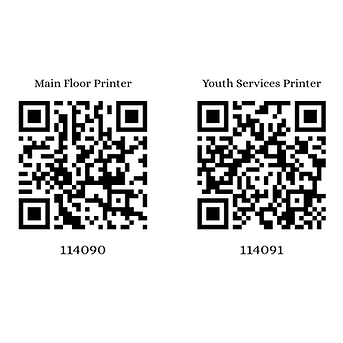
Printing in the Library? Scan the QR code below with your phone's camera.
Printing from home on a laptop or computer? Click on the name of the printer.
Main Floor Printer
Youth Services Printer
To Print an Email or an Email Attachment:
Forward the email to the printer's email address. This will print both the body of the email and the attachment(s).
Email your documents to ghail@ewprints.com.
Need a visual? Watch a quick how-to video:
Printing from a mobile phone or tablet / Printing from a laptop or PC /
Printing with the Princh Mobile App on iOS
Printing with the Princh Mobile App on Android
%20(1).png)
bottom of page